

Making potions is an important element for surviving in ArcheAge Chronicles, especially when things become difficult on the battlefield. Healing potions can be crafted with the help of ingredients obtained from the environment and a Brewing Furnace. It is not a hard task, as long as you know how to go about it and who to speak to. There is also a shortcut that allows you to reload your potions and daggers without having to equip them again.
How to Unlock Healing Potion Crafting

To start making your healing potions in ArcheAge Chronicles, move east from the town of Hope’s Watchtower, which is the first town you visit after finishing the tutorial. An NPC called Herlie can be found in the town, and you will have to talk to him to choose an option that teaches you to make healing potions. He will ask you to gather some Roseberries for him from his surroundings. Gather these ingredients and bring them back to him to continue the crafting tutorial.
How to Get Roseberries
The Roseberries can be found on the bushes in the vicinity. Approach one of the Roseberry bushes and hit F to harvest the materials. Each Roseberry bush yields a small number of berries; harvest a sufficient number of them before going back to Herlie. Hand over the Roseberries to him once you have harvested them in the required quantity. He will inform you that the Roseberries have to be crushed and boiled to make a healing potion.
How to Craft Life Flow Potions
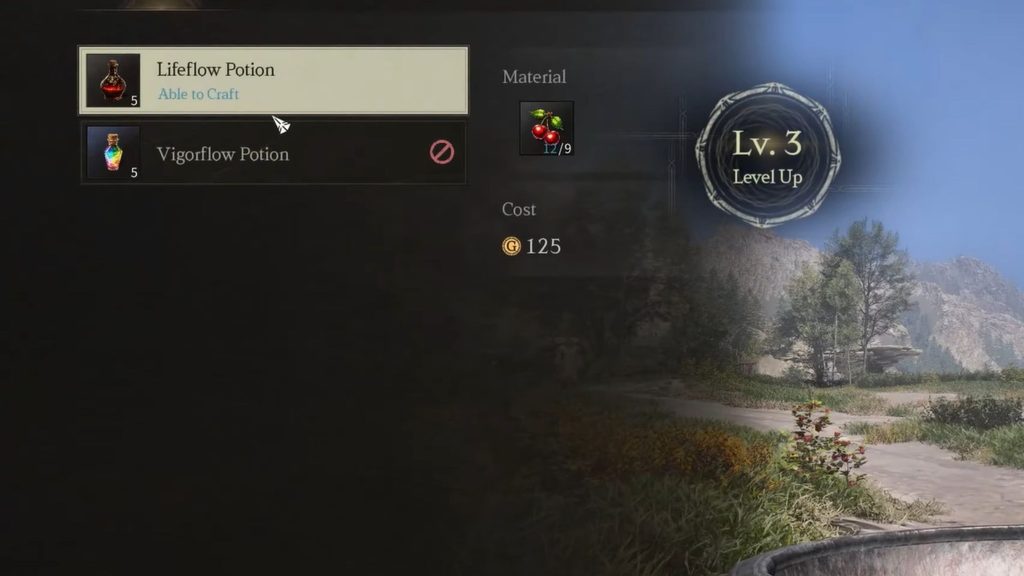
The Brewing Furnace can be found right next to Herlie. Interact with it to access the crafting menu, from where you can access the recipe for Life Flow Potion. It takes nine Roseberries and 250 Gold per batch of potions.
You can make as many potions as you wish, as long as you have enough ingredients and Gold. For example, to craft two potions, you need 18 Roseberries and 500 Gold. When you have enough materials and Gold, hit F to craft the potion. You will see a short crafting animation, and your Life Flow Potions will be ready shortly.
How to Refill Potions
It is possible to have five potions on your hotbar, but when using them during fights, the hotbar slots will be depleted. You may consider opening your inventory and equipping more potions, but there is an easier solution for you.
Press I to open your inventory, move to the Equipment section and choose your potion. After that, press F to get access to the refill option. Close the menu by pressing the Escape key. The hotbar will be filled with new potions.
The same thing can be done with your throwing daggers as well. This will save you from having to equip items to your hotbar each time you deplete them. However, you will still need to open your inventory to do this, so avoid trying it while surrounded by enemies. Find a safe spot before refilling your supplies, especially during combat.