Having insurance in COD MW4 DMZ could prove helpful in protecting your weapons and operators. Getting rid of your weapons during a game is rather annoying, particularly if you are carrying valuable weapons. But thanks to the game, there are options such as Weapon Insurance and Operator Insurance that will minimise your losses. Nevertheless, you should use these items wisely since they are limited. Here’s how insurance works in Modern Warfare 4 DMZ and how to equip it before a match.
How Does Insurance Work
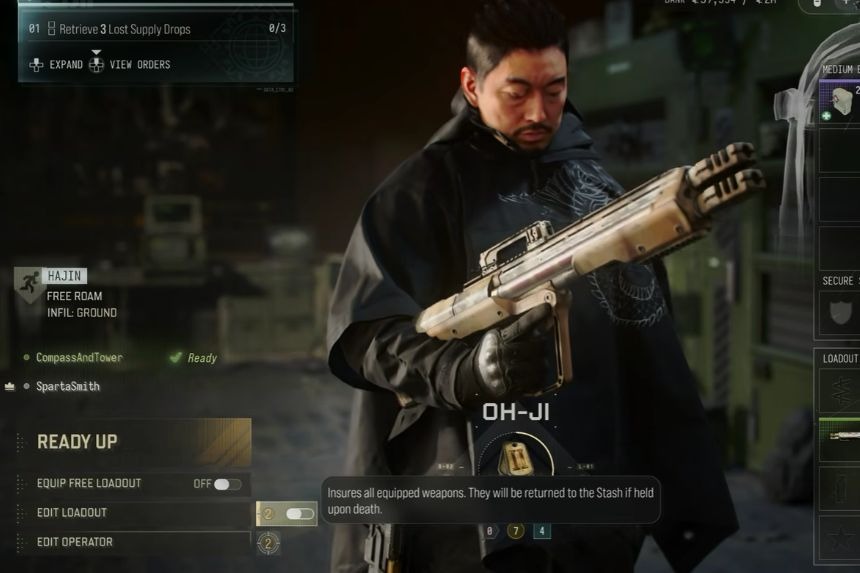
The player can use both Weapon Insurance and Operator Insurance to protect himself from losing any equipment during the game and avoid some penalties in case he dies. Both the weapons and the operator can be gained as pre-order items and via levelling up. Weapon Insurance lets you recover your insured weapon if you die during a match. Meanwhile, Operator Insurance removes the MIA retrieval cost, allowing you to recover your operator without spending anything.
How to Equip Weapon and Operator Insurance
In order to activate insurance, go to the Deploy screen before starting the game session. Choose the missions that you need to complete and move on to the last deployment configuration screen, where you will see two insurance icons located at the bottom part of the screen. One icon will represent Weapon Insurance, while the other icon will represent Operator Insurance.
Toggle the type of insurance that you wish to use. Keep in mind that insurance is consumed when you deploy, even if you successfully exfil. This means you will lose the insurance item whether you die or survive the match. Since these items are limited, it’s better to save them for difficult missions where there is a higher chance of losing your gear or operator.